Product tour
What Roots HQ actually looks like.
Six real screens from the admin, not mockups — annotated so you can see what each one is for. Every name, order and figure below is fictional: captured from a seeded demo workspace called Willow & Fern Studio, built for exactly this, never a live customer's data.
The markers on each screenshot are real, focusable links — tab to one, or click it, and it jumps to its numbered explanation below the image. Nothing here relies on hover alone.
Home base
One screen, everything that needs a decision today.
The dashboard an owner actually opens: what's happening today, what's waiting on you, and what Calyx already noticed — instead of a wall of charts that all say “fine.”
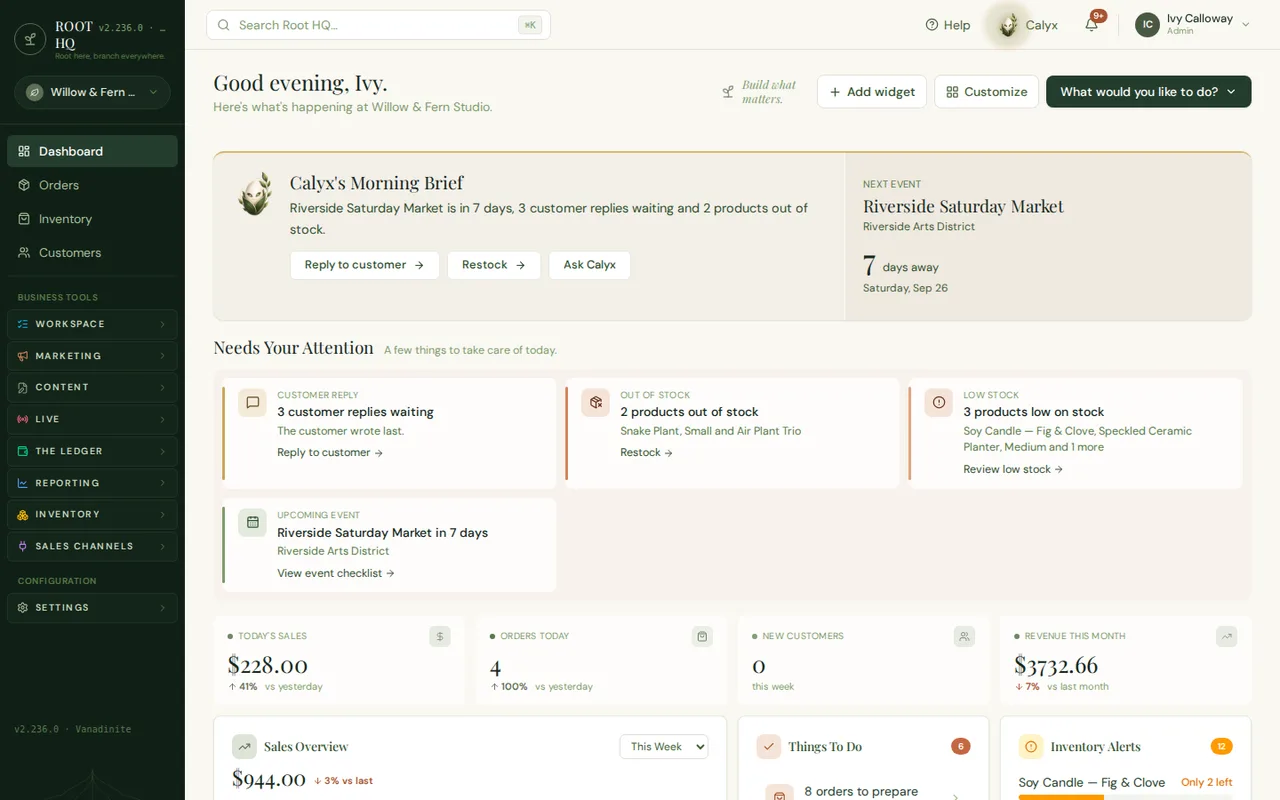
Calyx's Morning Brief. The AI assistant reads the whole workspace and summarises what changed, in one sentence, before the owner has opened anything — today, an upcoming market plus two things waiting on a reply.
Next Event. The next scheduled market, pulled from the events calendar, with a countdown — the same record that drives its checklist and pickup orders.
Needs Your Attention. Only the things that need a human decision today — a customer reply, a stock-out, a market coming up — not a scoreboard of everything that already happened.
Today's Sales and Orders Today. Real activity for the day, compared automatically to yesterday — not a number that resets to zero until an owner happens to open the page at the right time.
One sidebar. Marketing, The Ledger, Reporting, Inventory and Sales Channels all live in the same workspace — nothing here is a separate login.
Fulfilment
Every order, wherever it came from, in one board.
Orders placed on the storefront, at a market, for local delivery or for pickup all land on the same board, moving through the same stages, instead of four different inboxes to check.
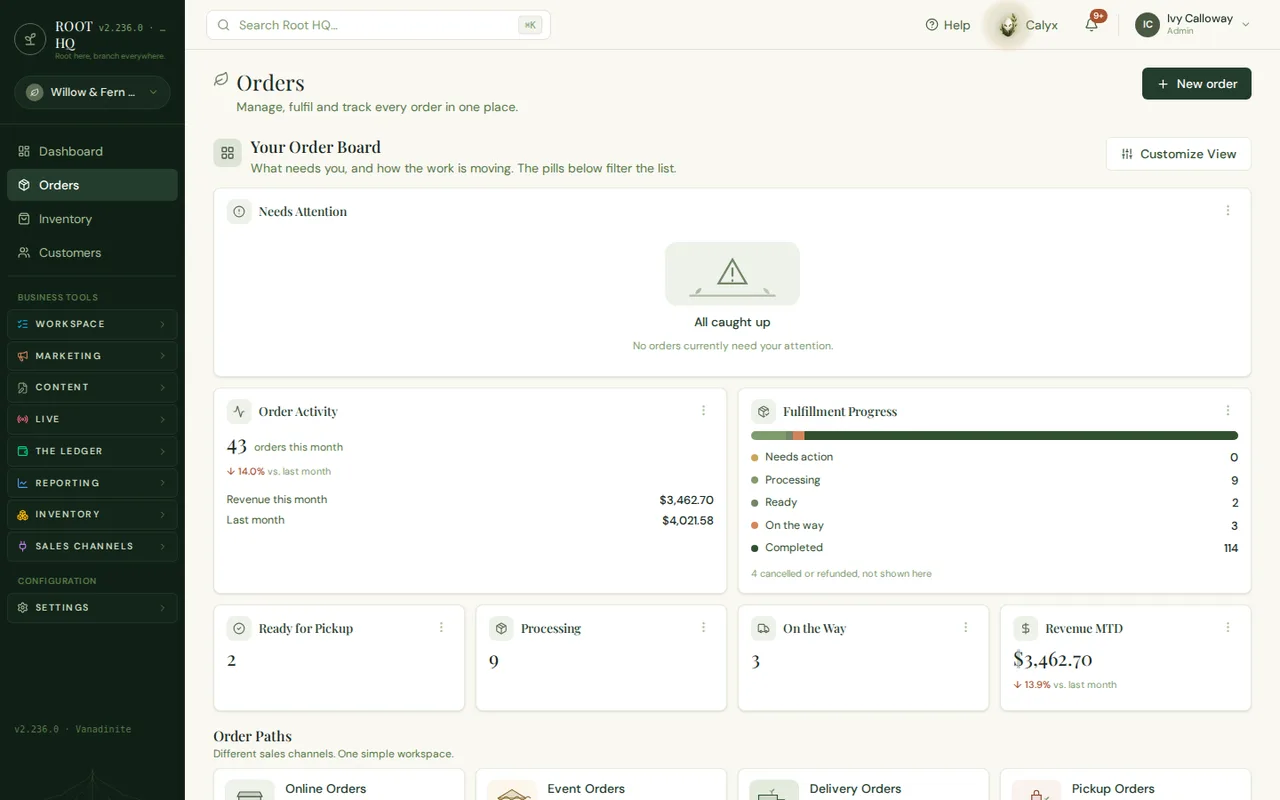
Needs Attention board. Automatically flags an order stuck on payment or delayed in shipping — empty here because this demo shop is caught up.
Order Activity. Orders and revenue this month at a glance, trending against last month without opening a report.
Fulfilment Progress. A live count of every order's stage, from Needs Action through Completed, so nothing sits forgotten mid-fulfilment.
Revenue MTD. The same order data that feeds The Ledger — sales and bookkeeping are not two separate exports to reconcile by hand.
Catalog
One catalog, priced and costed, sold everywhere.
Products, plants, pottery and paper goods in a single list — cost, price, quantity and where each item sells, without a separate spreadsheet to keep in sync.
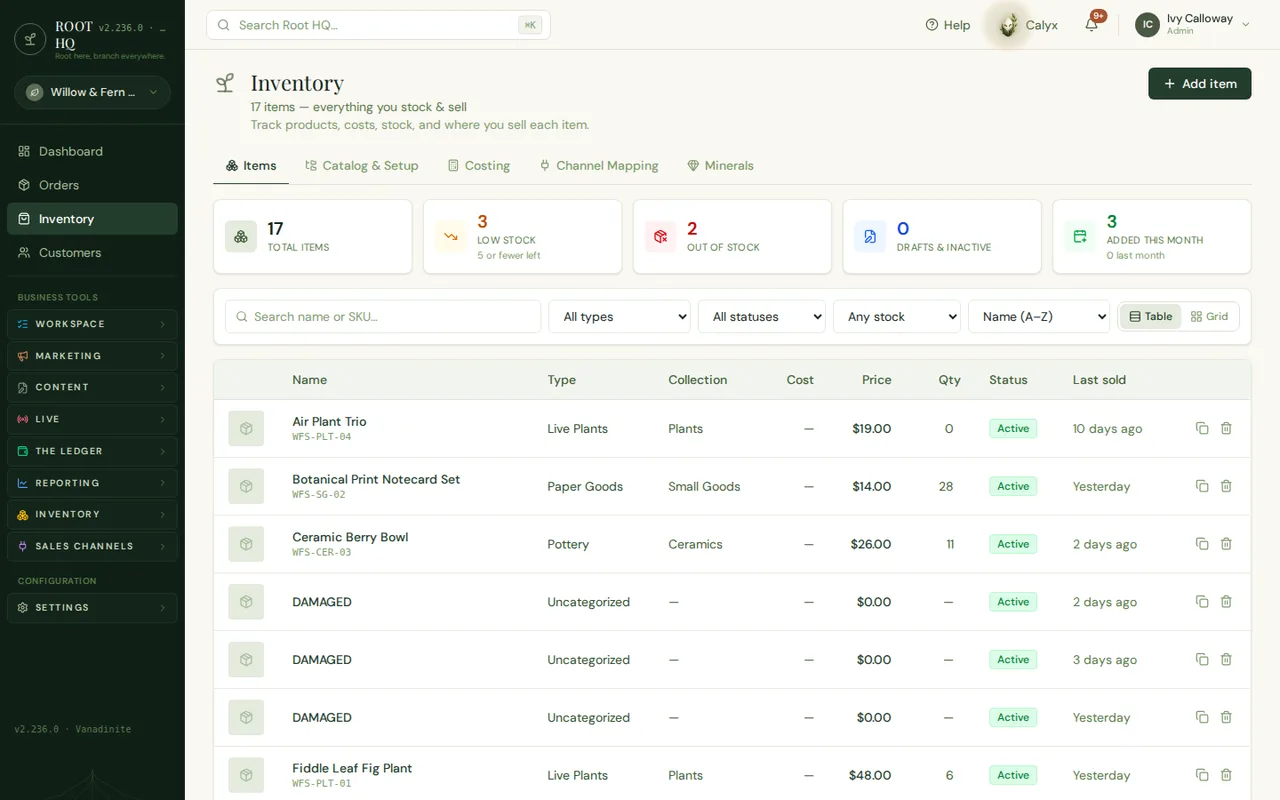
Low stock, counted automatically. No manual shelf check — the count updates as items sell, across every channel that sells them.
Channel Mapping tab. Map one item to how it is listed on each marketplace, so stock stays correct everywhere it is sold, not just on the website.
Cost and price, per item. Margin is visible row by row, not calculated separately at tax time.
Table or grid view. The same catalog, viewed the way that is actually useful in the moment — a spreadsheet or a visual grid.
Multi-channel selling
What each channel actually keeps, after fees.
Selling on Etsy, eBay, Shopify, Whatnot and a website at once usually means five separate fee statements. Roots HQ reconciles them into one answer: what came in, what each channel took, and what is actually left.
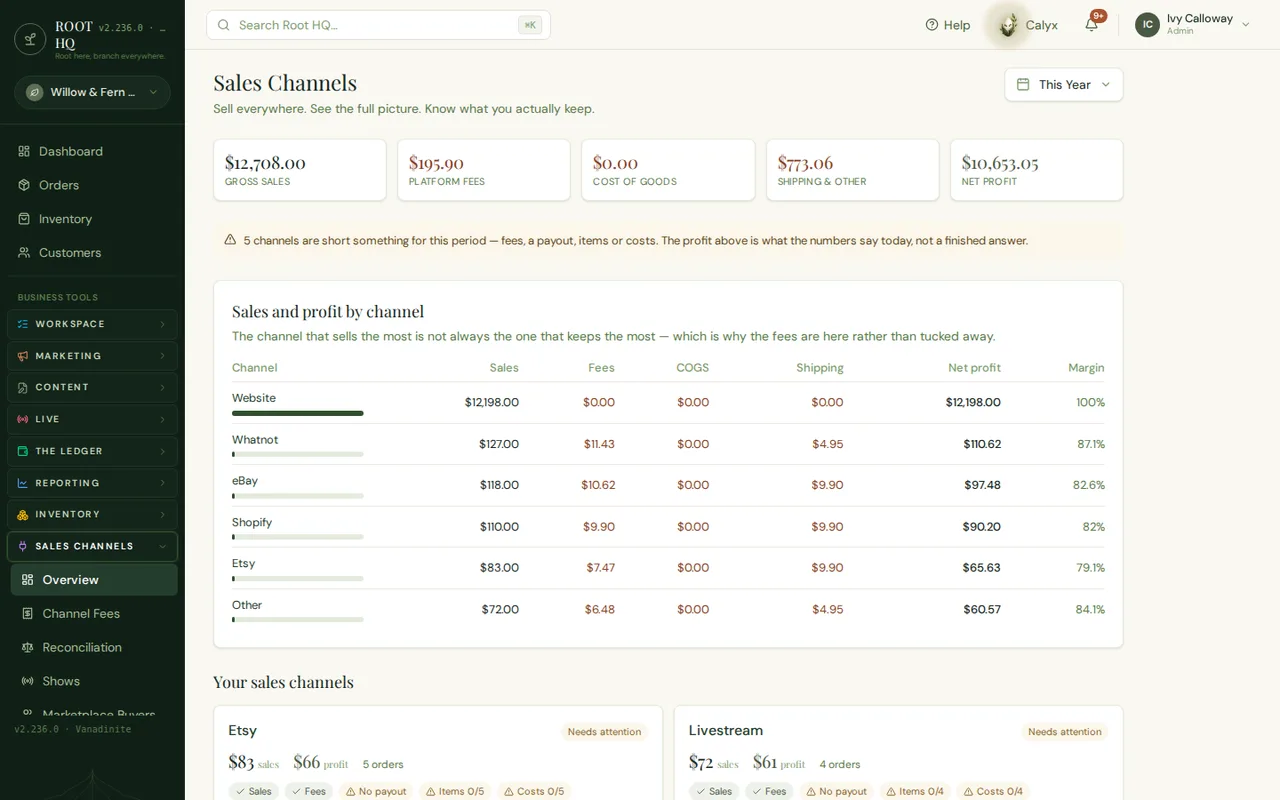
Net profit. True profit after platform fees, shipping and cost of goods — not the gross sales number a channel dashboard usually leads with.
Fees, channel by channel. Exactly what Whatnot, eBay, Etsy and Shopify each took, laid out side by side instead of buried in five separate statements.
"Needs attention" flag. Marks a channel whose fees, payout or item mapping is incomplete, so the profit number above stays honest instead of quietly wrong.
Bookkeeping
Real books, not just a sales dashboard.
Receipts, expenses, payouts and bank activity move through one workflow — captured, reviewed, recorded, matched — so the numbers a seller reports on are the numbers actually sitting in the bank.
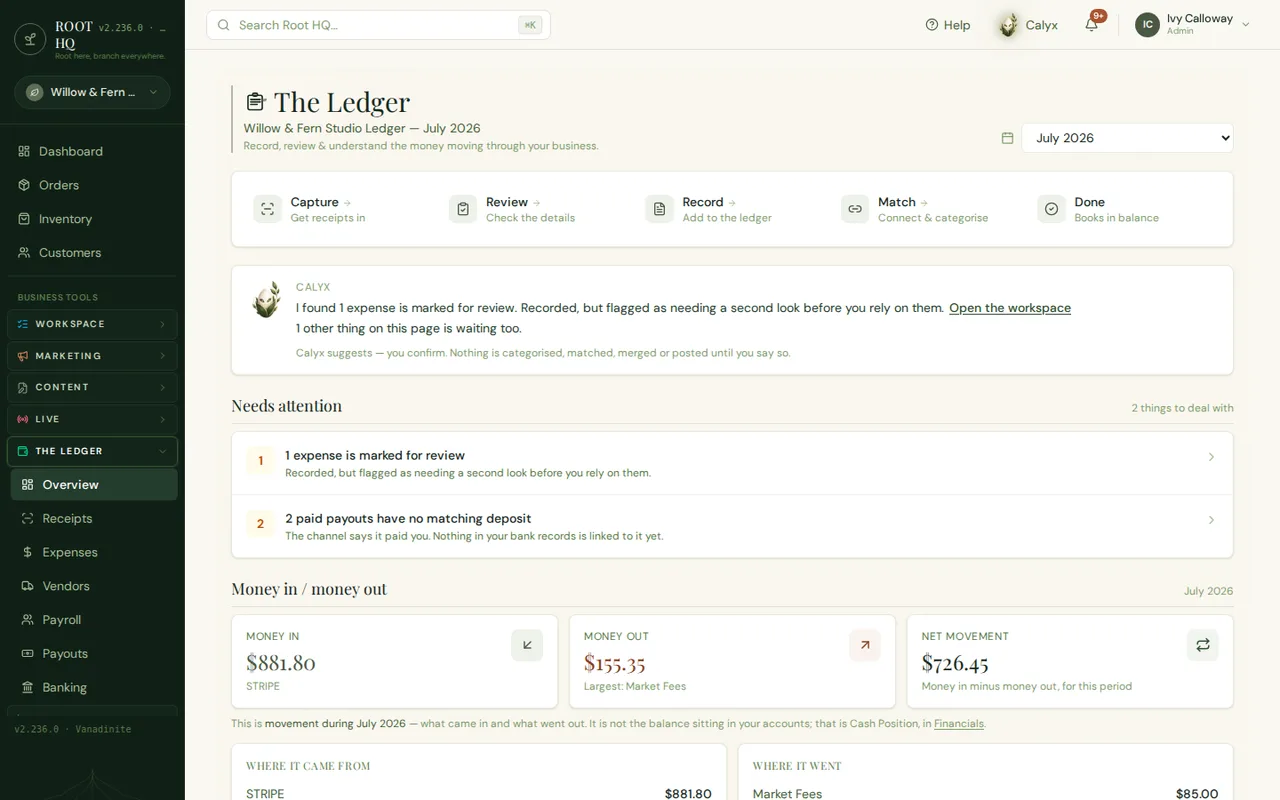
Capture → Review → Record → Match → Done. The whole bookkeeping workflow as one line, so nothing sits half-entered in a shoebox of receipts.
Calyx flags what needs a second look. It recorded the expense, but says so before the owner relies on the number — it proposes, it never posts silently.
Needs attention. An unmatched payout and a flagged expense, surfaced now — not discovered during a year-end scramble.
Money in / money out. What actually moved this period, by source — the difference between a sales dashboard and a set of books.
Calyx, the AI assistant
An assistant that proposes, and asks first.
Calyx watches customer activity across the business and suggests a specific next step — a win-back email, a promotion — in plain language. Nothing sends until the owner says yes.
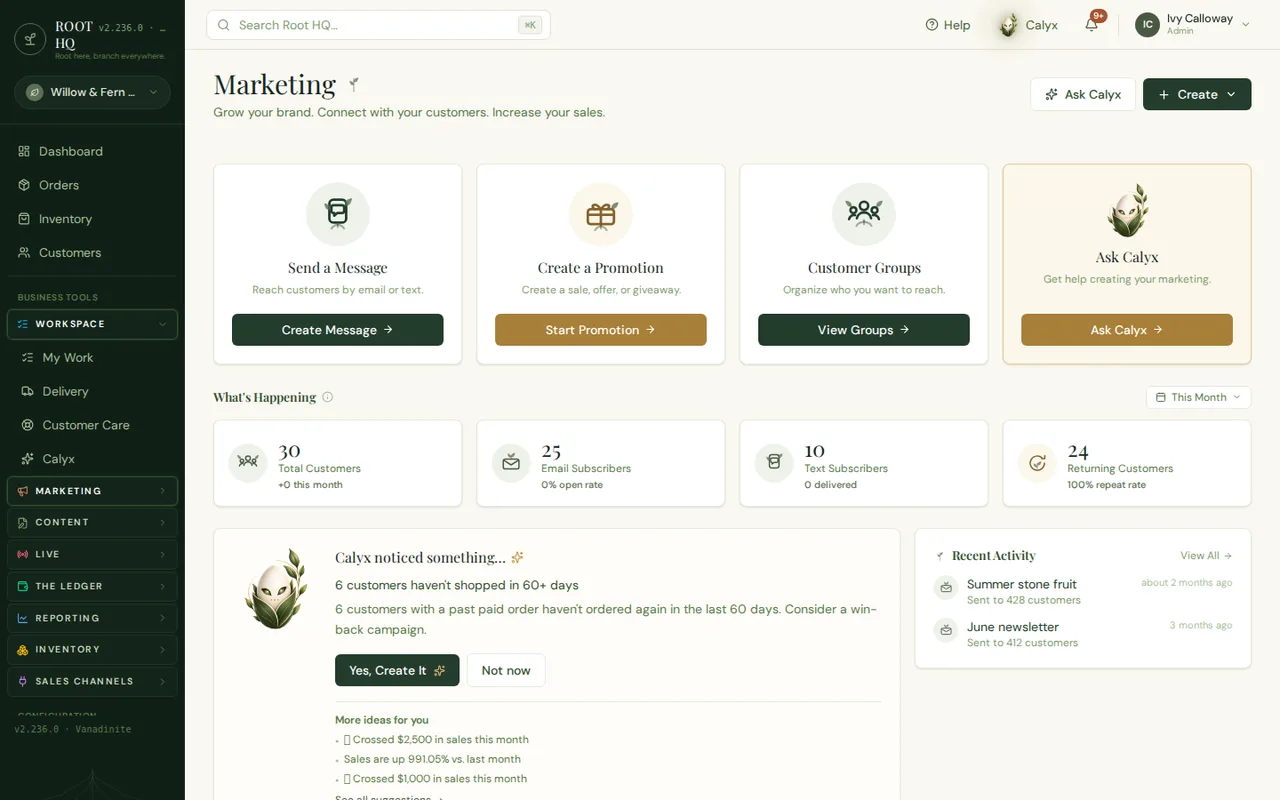
Ask Calyx. The assistant helps write the campaign — it is not only a report on what already happened.
Calyx noticed something. It watches customer activity and proposes one specific action — here, a win-back campaign to six lapsed customers.
"Yes, Create It" / "Not now". Calyx proposes, the owner approves. Nothing about a customer’s inbox happens without that click.
Returning customers. Repeat-purchase and subscriber counts tracked alongside the campaign tools that act on them, not in a separate app.
See how Roots HQ fits your business.
A guided walkthrough of the platform, mapped to how you sell.