Features
Everything a product business runs, organised the way it works.
Six parts of one business. Each starts with the real Roots HQ screen, and the full list of what is built — with its honest availability — sits underneath.
Sell
Your shop, your markets and your other channels — from one catalogue.
Add a product once and sell it in your Roots HQ storefront, at the booth in Roots POS, and on the page you share.
- Your own storefront, product pages and checkout
- Markets and events with prep checklists, pickup at the event and Roots POS at the booth
- Invoices with a link to pay online
- Your public site, blog and recipe pages from the same workspace
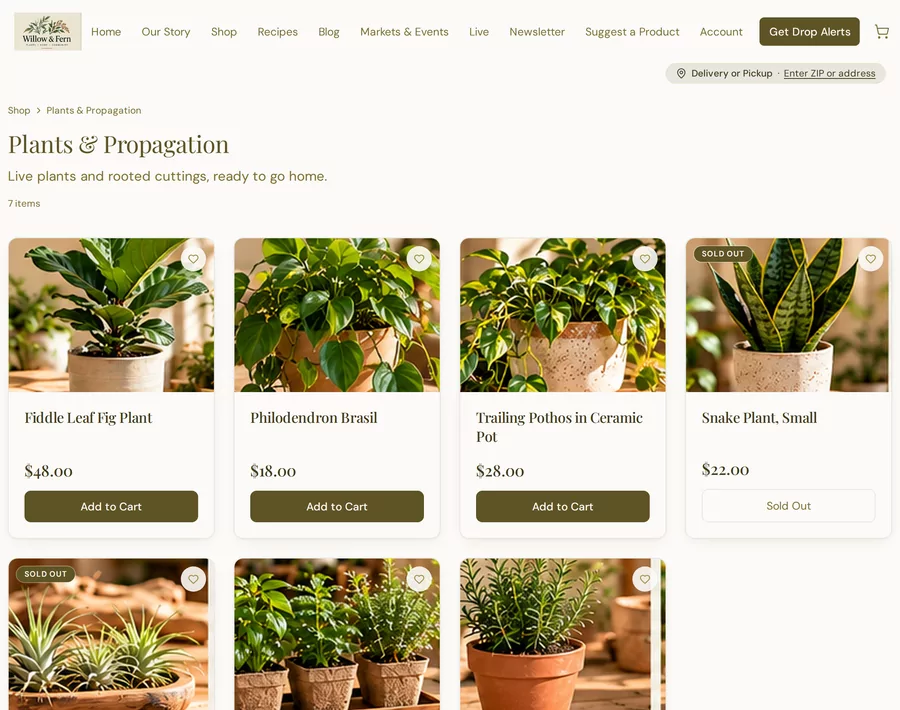
Real Roots HQ screens. Willow & Fern is a fictional demo business; all data shown is demo data.
Everything in SellShowHide
- In-person payments (POS): a card reader or keyed card entry through Square's Web Payments SDK — the card is tokenized by Square, never seen or stored in raw form — with the invoice marked paid and a receipt emailed automaticallyAvailable
- Phone tap-to-pay: the native Square SDK now ships inside the POS app, but a phone still can't tap to charge until the account has Square's Tap to Pay entitlement and the device itself is Tap-to-Pay eligibleLimited
- Live selling: schedule streams, spotlight products, run auctions, and work a claims/holds queue — orders from a stream land in the same queue as everything elseAvailable
- Event Checklists: start from a template (Outdoor Market, Indoor Pop-Up, Teacher/School Event, or blank) or build your ownNative
- Attach a checklist to a planned market date to pull in the event name, date, and location automaticallyNative
- "Always Include" items — star one once and it's added to every future checklistNative
- Progress at a glance ("18 of 26 packed"), overall and per sectionNative
- Cash Drawer verification: pick a drawer, see the expected float Roots HQ already remembers, type what you actually counted — the variance is shown as a note, never a blocker, and the count is read-only in Ledger → Cash Closeout so it can never be mistaken for incomeNative
- Branded, pen-markable printable checklist using your own business name and logoNative
- Market & event scheduling, shown on the public siteNative
- Website Pages: a block/section visual builder with Guided (starter templates, simple fields), Visual (block canvas and style panel), and Advanced (custom HTML/CSS) modesNative
- Blog Studio: publish, schedule, and manage posts, with performance summary cards, SEO fields, and a repurpose panel that drafts social and email versions of a postNative
- Media library for images and video, with automatic poster thumbnails generated for uploaded videoNative
- The Hearth: recipes and digital cookbooks — see belowNative
- Your storefront’s look: your colours, logo and site identity on your public site — kept separate from every other business (the Roots HQ admin itself stays Roots HQ)Native
- Write/Improve with Calyx inside the page and blog editors — you review and publish, Calyx never publishes on her ownNative
- Smart Paste: paste a recipe from a notes app, a document, an email or an AI chat and it is read into a title, description, times, servings, yield, oven temperature, ingredient sections and numbered stepsNative
- Everything Smart Paste detects is shown for review before anything is saved — and keeping your plain text exactly as written is one of the options, not a failure caseNative
- Ingredients as plain text (the fastest way) or structured with sections you name, an optional brand, and notesNative
- Link an ingredient, or the recipe itself, to a product you sell — so the public recipe can say what it was made with and offer itNative
- Steps: paste your directions and split them into individual steps, then reorder, edit, or add a tip to any of themNative
- Images and video come from your Media Library or a direct upload — there are no image addresses to pasteNative
- Digital cookbooks with your own cover, author, intro and chapter names — nothing about the structure is fixed for youNative
- A cookbook holds links to your recipes, never copies: one recipe can sit in several cookbooks, editing it updates all of them, and removing or deleting a cookbook never deletes a recipeNative
- Draft, Published, Scheduled, Private, and Unlisted — where Unlisted is reachable by direct link or QR code but is not listed publiclyNative
- A public cookbook your customers can actually read, on your own storefront — chapters, recipe cards, and a Cooking Mode that shows one step at a time in large type with two big controls, for a phone on the counter or a tablet propped up in the kitchenNative
- Import several recipes at once — from a recipe file exported by another app, a saved recipe web page, or plain text holding several recipes. Everything arrives as a draft for you to look at before it goes anywhere.Native
- Recipe analytics: views, saves, shares and clicks through to the products a recipe is made withNative
- Sell a cookbook as a digital product: set a price, and customers buy it through your normal checkout. It's an ordinary order — same payment, receipt, reporting and refunds as anything else you sell — and access is unlocked the moment payment lands, including for guests who never made an accountNative
Manage
Products, stock and customers that ask about what you actually sell.
Your own product lines and fields, one stock count behind every place you sell, and one record per customer however they bought.
- Product lines with your own fields — start from preserves, baked goods, minerals, skincare or general merchandise, or build your own
- Quantity, variants or one-of-a-kind pieces
- Shop collections kept separate from how you organise stock
- One customer record across every channel
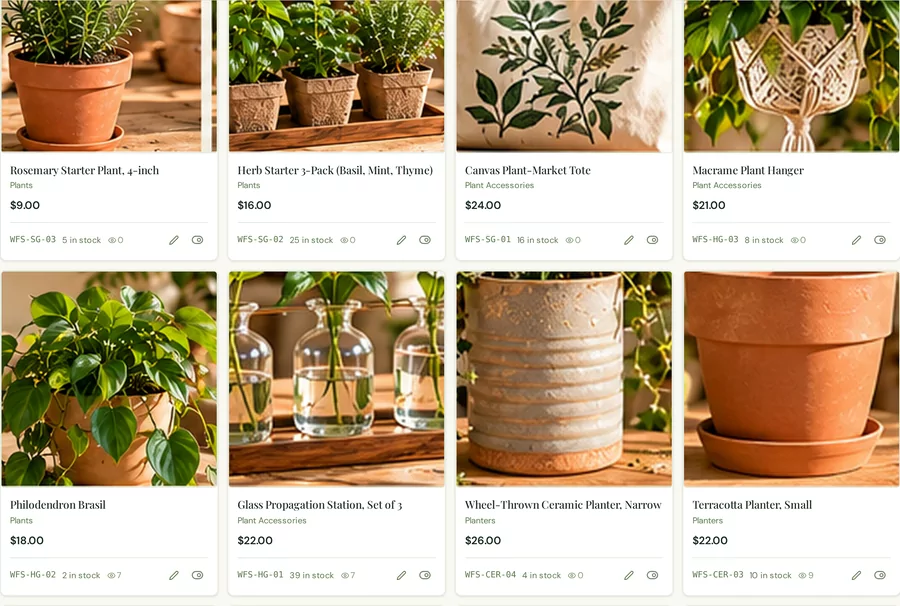
Real Roots HQ screens. Willow & Fern is a fictional demo business; all data shown is demo data.
Everything in ManageShowHide
- Product lines you define — six starters (preserves, baked goods, minerals, skincare, general merchandise, blank) or your own, added and changed at any time without disturbing a single item already savedNative
- Your own item fields in ten types, with units, options and defaults — and per-field control over whether each one is collected internally, shown to customers, or bothNative
- Turning a field off stops asking for it and never deletes what's already there; cost, vendor and tax fields can't be published at allNative
- Three ways to count stock per item: quantity, variants with their own SKU/price/cost/stock, or individual one-of-a-kind pieces at quantity oneNative
- Adaptive item editor — an always-visible Quick Add that saves a draft on its own, with six sections that fold away until you need themNative
- Duplicate Listing copies what describes the item and refuses to copy its SKU, barcode, QR code, URL, stock, orders or published stateNative
- Create five unique pieces in one action — five draft records with their own identity and their own money, plus a bulk quick-edit tableNative
- Cottage Food Profile — a compliance and labelling profile with your own jurisdiction, applied per product line and overridable per item, with a recorded source and effective dateNative
- Unified Products & Inventory — standard goods and unique mineral/crystal/gemstone specimens share one item type field and one list, not two separate systemsNative
- Per-channel visibility: show an item on the website, the POS app, or both, independently of each otherNative
- Vendor and sourcing tracking, down to the specimenNative
- Your own fields register with the report builder automatically — no second setup stepNative
- Specimen-level financials: cost, listing status, and per-item P&L for unique inventory, plus marketplace cross-listingAvailable
- AI-assisted price suggestions for mineral specimens, built from comparable sales you choose — always a suggestion you approve, adjust, or override, never applied automaticallyAvailable
- Variants are fully modelled and editable in the admin; the public storefront still sells the parent item rather than offering a shopper-facing option selectorAvailable
- Shop Collections and Inventory Categories kept separate — fourteen preserve families can sit inside one shop tab and stay available as customer filtersNative
- Four ways to fill a collection: by inventory category, hand-picked, straight from your mineral inventory, or by rulesNative
- Automatic collections with grouped include/exclude conditions — category, type, tag, price, availability, seasonal, cottage-food — with AND and OR spelled out, evaluated against live inventoryNative
- Scheduled collections in YOUR time zone, with a stated end behaviour: hide, keep visible as Seasonal, or hand over to another collectionNative
- Independent visibility per sales channel — website, POS, event ordering, preorders, QR shopping page, private invoice catalogNative
- Empty-collection handling you choose: warn me, hide it, show “Coming Soon”, or keep it browsableNative
- Archive preserves everything and can be undone; permanent deletion requires typing the collection name and removes only the groupingNative
- Calyx reviews the arrangement on request — unassigned products, empty collections, missing images, duplicate names — and never moves, renames, hides or deletes anything herselfPlanned
- Each collection is a tab on the shop page; individual collections do not yet have their own landing-page URLNative
- Unified contact records, segments built by behavior and attributes, and a shared support inboxNative
Fulfill
Every order has a path — shipping, pickup, local delivery or the event.
Orders from your shop, your events, pickup and delivery, and synced eBay and Etsy orders land in one queue, and each shows what it needs next.
- Live carrier rates, labels and tracking through your own EasyPost account
- Pickup at your shop or at your next event
- Local delivery in your radius with weekly windows and route ordering
- One order queue across channels

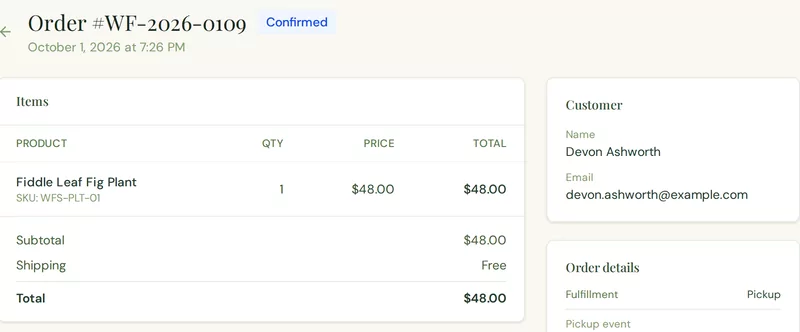
Real Roots HQ screens. Willow & Fern is a fictional demo business; all data shown is demo data.
Everything in FulfillShowHide
- One order queue across channels — filterable by status (processing, awaiting shipment/pickup, shipped, delivered, cancelled, refunded) — tracked through to delivered or picked up, with the customer emailed along the wayNative
- Live carrier shipping rates, label purchase, and trackingNative
- Local delivery with weekly windows you define — each with its own capacity and cutoff — a radius measured from your own address, and a per-item opt-inNative
- Route solving: stops reordered into the shortest round trip, with per-leg mileage and a running ETA. Deterministic maths, not a model — free, instant, and the same answer every timeNative
- One-tap export of the solved route into Google Maps or Apple Maps, split into legs when a run is longer than one link can carry, plus CSV for the driverAvailable
- Calyx plans the delivery day on request — which waiting orders belong on which run, overloaded windows, addresses that need a call — and applies none of it herselfNative
Connect
Keep selling where you already sell.
Some things are built in, some are live connections to accounts you own, some work once credentials are set up outside the app, and some come in as a file you upload. Each one is labelled for exactly what it does.
- Native: storefront, markets & events, pickup & delivery, invoices
- Connected: Square and PayPal payments, EasyPost, your email provider
- Limited: eBay and Etsy order sync, once your own app credentials and OAuth tokens are configured
- Import: Shopify, Whatnot and Palmstreet sales
Part of Roots HQ itself.
Your Roots HQ storefront
Your own shop, product pages and checkout, run from the same catalogue as everything else.
Markets & events, with Roots POS
Plan events, take orders ahead for pickup there, and sell at the booth in Roots POS on an Android phone or tablet.
Pickup & local delivery
Customers choose pickup (including at your next event) or local delivery within your radius.
Invoices
Send an invoice with a link to pay online.
A live connection to an account you own. Data moves on its own, within the scope stated.
Square
Card payments in Roots POS and on invoice payment links, through your own Square account.
PayPal
Customer payments at storefront checkout and on invoices, through your own PayPal account.
EasyPost
Live carrier rates, label purchase and tracking, through your own EasyPost account.
Your email provider
Order emails and email campaigns are sent through the email provider you choose (SMTP).
Order sync is available after developer-app credentials and OAuth tokens are configured. Roots HQ does not yet complete the eBay/Etsy sign-in flow inside the app.
eBay
Pulls eBay orders into your Roots HQ order queue using your own eBay developer app.
Etsy
Pulls Etsy receipts into your Roots HQ order queue using your own Etsy app.
You export a file from the other platform and upload it. Nothing updates on its own.
Shopify
Bring your Shopify sales into your reports by uploading an export.
Whatnot
Bring your Whatnot sales into your reports by uploading an export.
Palmstreet
Bring your Palmstreet sales into your reports by uploading an export.
Everything in ConnectShowHide
- Marketplace order consolidation: eBay and Etsy order sync works once your own developer-app credentials and OAuth tokens are configured (Roots HQ does not yet complete their sign-in inside the app, and their platform fees aren't reported by those APIs, so those two channels show $0 in fees until reconciled); Whatnot, Shopify, and Palmstreet import by CSVLimited
Understand
Where the money came from, and where it went.
Sales by channel, your books and your mileage in the same workspace as the orders behind them.
- Sales Dashboard across your shop and other platforms
- The Ledger: expenses, receipts, vendors, purchase orders and payouts
- Mileage tracker and a tax-year roll-up
- One-click reports, plus a report builder
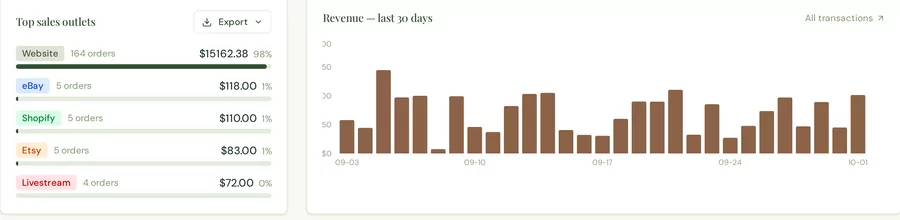
Real Roots HQ screens. Willow & Fern is a fictional demo business; all data shown is demo data.
Everything in UnderstandShowHide
- The Ledger: expenses, receipts, vendor purchase orders and receiving, and payouts tracked against your real transactions in one workspaceNative
- Receipts: photograph a receipt and file it line by line, reusing the same AI-OCR pipeline as the rest of the platformNative
- Payroll tracking alongside your other expensesNative
- Payouts: processor deposits tracked against sales, with cash-drawer closeouts and live varianceNative
- Mileage Tracker: quick or full-detail trip entry, round-trip flag, optional vehicle profiles, and a per-year, per-purpose mileage rate snapshotted on each tripNative
- Tax Center: mileage, deductible expenses, sales tax collected, and processing fees rolled up by tax year and broken down by purpose, event, and vehicle, with a review flag if you're deducting both mileage and vehicle expenses in the same year — exported as CSV, Excel, or a print-ready PDF, labeled an organizational summary, not tax adviceLimited
- One-click Profit, Sales, Expenses, Inventory Value, Top Products, Sales-by-Channel, Payouts & Fees, and Customer reports, plus custom report buildingNative
Grow
Bring customers back, from the customers you already have.
Campaigns, promotions and follow-ups built from the same customer records your orders create.
- Email campaigns through your own email provider
- Promotions in one hub: coupons, giveaways, prize wheels, loyalty
- Customer groups and automations
- Lead-capture forms and QR codes for the market table
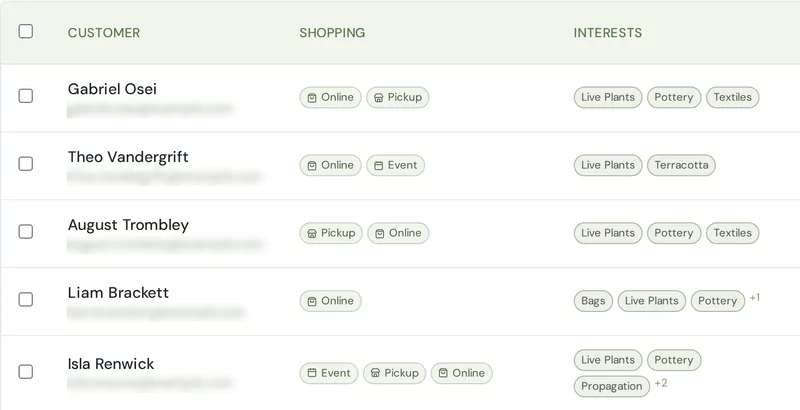
Real Roots HQ screens. Willow & Fern is a fictional demo business; all data shown is demo data, and customer emails are blurred.
Everything in GrowShowHide
- Promotions hub: coupons & discounts, prize wheels, giveaways, loyalty & rewards, and special offers in one page, with a guided "what are you trying to do?" builderNative
- Customer-group targeting on coupons, automatic discounts, and giveaway entry — enforced at checkout or entry, not just labeled, and the group name is never shown to the publicNative
- Multi-step automations — a background engine evaluates active workflows on a schedule and only ever acts on what happens after a workflow is switched onNative
- Email campaigns built from content blocks, with live desktop and mobile preview — sent through your own SMTP providerAvailable
- Lead-capture forms that feed straight into the CRMNative
- QR codes with click tracking, plus AI-designed printable market flyersAvailable
Away from the desk
Roots Manager and Roots POS, on Android.
Manager runs the day from your phone — orders, inventory, your work and Calyx’s brief. POS sells at the booth or the counter, against the event you are at. Both are Android apps; the full workspace is in the browser.
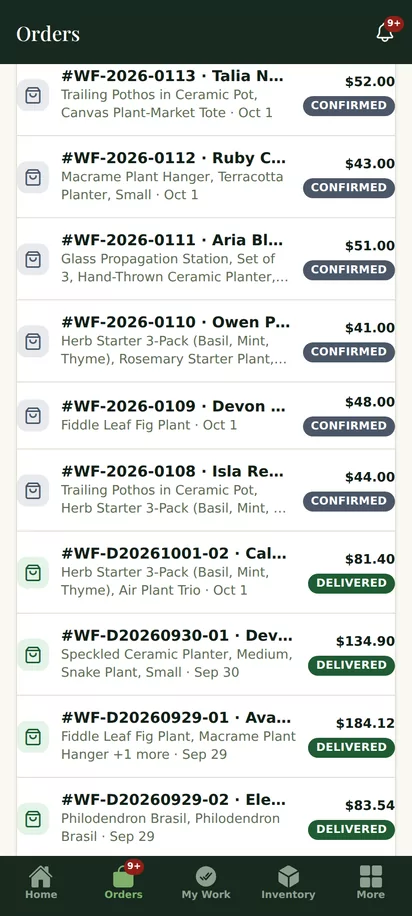
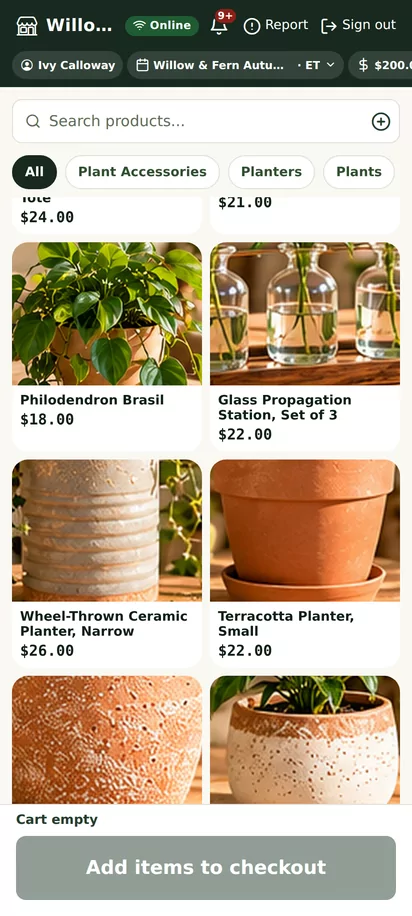
Real Roots HQ screens. Willow & Fern is a fictional demo business; all data shown is demo data.
Calyx
Calyx helps you see it. You decide.
The assistant inside Roots HQ explains what is happening, drafts with you and proposes next steps. Supported changes are applied only after you review and confirm them.
Propose
Calyx spots something and suggests a next step.
Review
You see exactly what would change.
Apply
Only when you confirm. Or not at all.
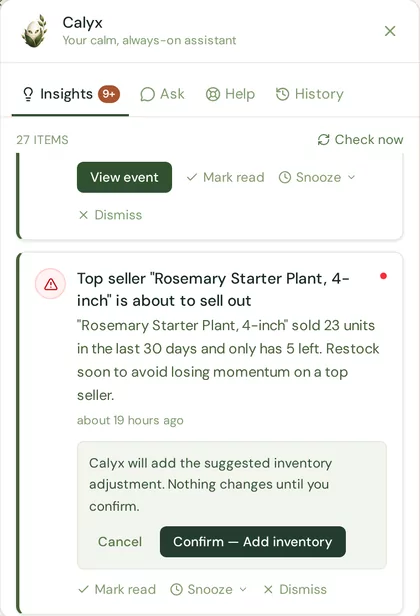
Calyx’s own review step, from the Willow & Fern demo workspace (fictional data).
Everything in CalyxShowHide
- Morning Brief: a short daily summary — orders to prepare, upcoming events — surfaced on the dashboardNative
- Insights: proactive daily nudges produced by a deterministic rules engine reading your data on a schedule — not a live AI/LLM call, so it's fast, free to run, and predictableNative
- Ask: grounded question-and-answer over a snapshot of your own business data, with an optional outside-web lookup for market questionsNative
- Help: a searchable library of guided walkthroughs — a floating on-screen pointer and step-by-step tooltips drive you to the exact button or field, across nearly every feature in the appNative
- History: the last 30 days of what you asked Calyx and what she answered, including drafts she wrote, pruned automatically after 30 daysNative
- Draft assistance: email copy, blog posts, product copy, and mineral price suggestions from comparables you select — always a draft or suggestion you review and approve, never sent or published on its ownNative
- Usage is metered in fractions of a cent and rolled up monthly into your own Ledger as a real, visible operating expenseNative
Root here. Branch everywhere.
Tell us about your business.
Roots HQ is currently welcoming selected businesses into the beta. Every business applies the same way: tell us where you sell and what takes too much of your time — that is how we learn whether Roots HQ fits, and where your setup should start.
What the application is for
- Tell us how you sell, not why you deserve it
- Your application is reviewed by our team
- Standard onboarding is included with every Roots HQ plan.